
🧹 Tidy Up! — Sorting & Shelving Simulator Toolkit
Production-Ready Cozy Organization, Physics Sorting & Dynamic Shelving Framework
Bring satisfying, tactile organization gameplay to life. Engineered with an automatic physics sleeping optimizer, magnetic slot snapping, tiered upgrade shop, atomic save system, and 3 turnkey demo scenes.
🎬 Showcase & Included Scenes
3 Turnkey Scenes Included
Tidy Up! ships with 2 complete playable level challenges plus a dynamic 3D living diorama main menu:
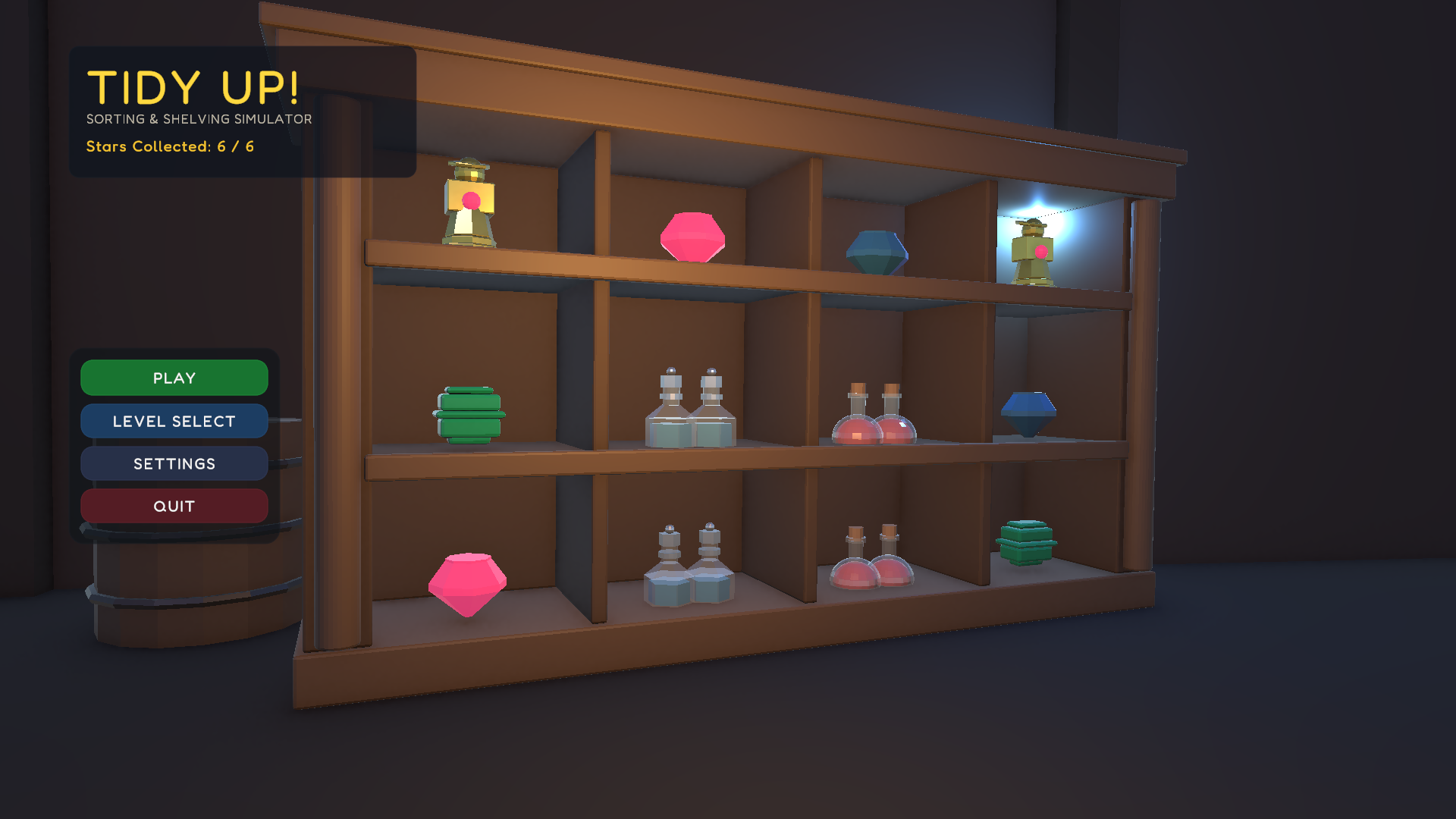
Cozy 3D Organization Experience
Includes MainMenuScene (dynamic 3D living diorama with level select modal), ApothecaryDemoScene (Level 1: 48 items across 4 categories), and WorkshopDemoScene (Level 2: 60 items across 5 categories).
🏰 Apothecary Demo Scene (Level 1)
48 items across 4 categories: Potions, Crystals, Alchemical Tools, and Sacred Scrolls. Features warm tavern lighting, wooden shelving, and a 180-second par time challenge.
⚒️ Grand Workshop Demo Scene (Level 2)
Expanded 60-item challenge across 5 categorized zones: Ingots, Raw Gems, Precision Tools, Artifacts, and Rare Elixirs. Features stone forge visuals and a 240-second par time.
🛋️ Living Diorama Main Menu
Dynamic 3D menu environment with smooth camera drift, level select modal displaying live star ratings and best times, and an audio/controls settings modal.
✨ Key Features & Architectural Highlights
⚡ Automatic Physics Sleeper
Adaptive physics optimizer (PhysicsSleeper) that transitions resting props to zero-cost kinematic sleep. Eliminates PhysX CPU spikes when dozens or hundreds of items are loose in piles.
📦 Procedural Shelving & Snapping
ShelfZone, ProceduralShelf, and ShelfSlot components provide magnetic snapping, orientation overrides, hover indicators, and placement bounce juice with particle puffs.
📊 Single Source of Truth Progress
CompletionTracker maintains exact counts of spawned, placed, and remaining items. Features a par time engine that awards 1, 2, or 3 stars upon level victory with zero tally desyncs.
💰 Currency & Upgrade Shop
Earn currency per placed item with floating score popups. Spend coins in the UpgradeManager shop across 4 progression paths: Carry Capacity, Walk Speed, Interact Reach, and Item Highlighting.
💾 Atomic Save/Load Architecture
Fault-tolerant persistence via temporary buffers (.tmp) and rolling backups (.bak), ensuring complete save integrity across crashes or cloud synchronization.
🛠️ Flagship Editor Developer Suite
Built-in Dashboard Hub, 1-click Scene Setup Wizard (5-header hierarchy), Level Health & Auditor with 1-click auto-fixes, Bulk Item Importer (CSV), and Theme Preset Switcher.
📊 Technical Specifications
| Attribute | Specification |
|---|---|
| Supported Unity Versions | Unity 6 (6000.0+) or Unity 2022.3 LTS+ |
| Render Pipeline | Universal Render Pipeline (URP) |
| Input System | Unity New Input System (com.unity.inputsystem) |
| UI & Text | TextMeshPro / uGUI with included Fredoka font styling |
| Included Scenes | 3 turnkey scenes (MainMenuScene, ApothecaryDemoScene, WorkshopDemoScene) |
| Package Root | Assets/SortAndShelveToolkit/ |
| Assembly Definitions | SortAndShelveToolkit.Runtime.asmdef & SortAndShelveToolkit.Editor.asmdef |
| Source Code | 100% full C# source code, XML docs, zero DLLs or obfuscation |
🚀 Quick Getting Started Preview
Scaffolding a new level takes 1 click using the built-in Scene Setup Wizard:
- In Unity, create a new scene (
File > New Scene > Basic (URP)). - Open
Tools > Nipun Interactive > Tidy Up! - Sorting & Shelving Simulator Toolkit > Scene Setup Wizard. - Click ★ Setup Entire Scene (All in One) to generate the 5-header hierarchy, player rig, core managers, and HUD.
using SortAndShelveToolkit.Runtime.Shelving;
using SortAndShelveToolkit.Runtime.Items;
using UnityEngine;

public class CustomPlacementListener : MonoBehaviour
{
    [SerializeField] private ShelfSlot targetSlot;

    private void OnEnable()
    {
        // Subscribe to item placement events
        SortAndShelveToolkit.Runtime.Core.Events.ToolkitEvents.OnItemPlaced += HandleItemPlaced;
    }

    private void OnDisable()
    {
        SortAndShelveToolkit.Runtime.Core.Events.ToolkitEvents.OnItemPlaced -= HandleItemPlaced;
    }

    private void HandleItemPlaced(ItemInstance item, ShelfSlot slot)
    {
        Debug.Log($"Satisfying snap! {item.Definition.DisplayName} placed on {slot.ShelfZone.DisplayName}.");
    }
}
📚 Deep Documentation Links
Explore the complete multi-page architecture guides and API reference: